6.2 is now available


Our commitment for Unity 6 is to provide a faster, more reliable, and more stable Engine. We’re excited to announce that Unity 6.2 is now production-supported. It includes Unity AI Beta, which will continue to be free and in beta with the release of 6.2.
Download Unity 6.2 today, or see more details and bug fixes in release notes.
Unsure how to go about upgrading? Check out the upgrade guides to help you go from previous Unity releases to Unity 6.2. For complex productions with a high number of dependencies, find out how our Success Plans can ensure the upgrade process goes smoothly.
Join us live on stream on August 19th to break it down:
Try Unity AI Beta and provide feedback
Make creating with Unity faster and easier. Natively integrated in the Unity Editor, the Unity AI Beta is included as part of the production-supported Unity 6.2 release. Unity AI provides contextual assistance, automates tedious tasks, generates assets, and lowers the barrier to entry. Learn more here
All users who install Unity AI get free, unlimited Unity Points during the beta. Points will expire when Unity AI transitions to a paid model in the future. In the meantime, we’d love your feedback. Check out the roadmap and share your suggestions.
Here are a few things it can help you do:
- Easily audit your assets: Get quick, focused help with your GameObjects, scripts, Prefabs, and more–just drop them into Assistant without having to spell out every detail.
- Locate, modify, and organize in bulk: Automate repetitive tasks in-editor, like locating lights over a set intensity or objects missing Rigidbodies, and update names, layers, or components all at once.
- Debug console errors: Ask Assistant to explain scripts or error messages directly in the Editor to better understand and resolve issues.
- Learn Unity development: Get thorough explanations and step-by-step setup guidance for complex Unity features or concepts (like Colliders or VFX Graphs) directly in the Editor.
- Quickly set up scenes: Use plain language commands to generate objects, place assets, and automate scene setup.
- Generate placeholder assets: Create sprites, textures, animations, and sounds directly in Unity—properly formatted, no extra setup or context switching required. Plus, trace their use for replacement when going to production.
AI data: You’re in control
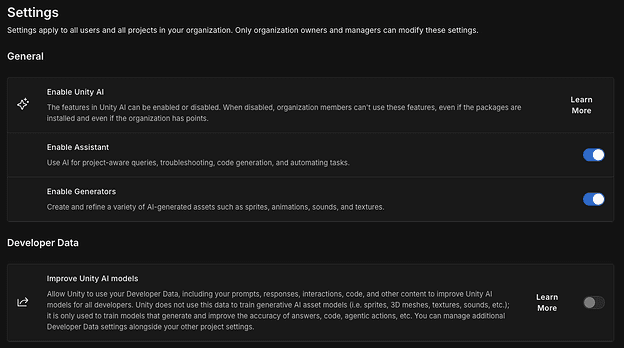
Developer Data sharing is defaulted to off with Unity AI. If you choose to opt in, Unity may use developer data (such as your prompts and metadata from attached objects) to improve AI model responses. We do not use your runtime application (the binary itself) or media assets such as your images, meshes, or audio to improve Unity AI.
All of these settings are accessible in the Unity Dashboard. Learn more here.
Unity AI improvements from your feedback
Unity AI was released in Unity 6.2 on May 15th, and we have since been listening to your feedback and working hard to incorporate these improvements. Below are a few items we want to highlight based on what we heard from you:
- Enable/Disable AI Setting: Turn off AI Assistant and Generators org-wide in the Unity Dashboard, to align with your AI policies.
- Hide AI Button: New local project setting to remove the AI button from the Editor UI.
- AI Model Transparency: Updated AI Guiding Principles page to clarify Unity's AI model usage and data practices with third-party partners, and more.
- Improved Pretrained Models: Access higher-quality LoRas based on FLUX and GPT-Image for more detailed outputs.
- Inference Engine graphs: Visualize your neural network graph inside Unity to better optimize local AI model inference.
We will continue taking feedback and actively listening to your ideas. Visit the roadmap to see what is planned and share your feature requests.
Additional highlights from the production-supported Unity 6.2
All of this is included as part of today’s release of Unity 6.2, along with:
- Android XR updates in 6.2: Unity 6.2 introduces key updates to strengthen Android XR development. Unity's Android XR package transitions into a verified state with 6.2, providing developers with a stable and production-quality foundation for building Android XR applications. We strongly recommend upgrading to Unity 6.2 as the verified package aligns with the latest engine improvements and offers the most robust support for Android XR. Notable updates include:
- Hand Mesh Functionality: Users can now visualize hand meshes and utilize them for occlusion.
- Dynamic Refresh Rate: Support for dynamically adjusting the display's refresh rate during runtime ensures smoother performance.
- Visibility Mesh Occlusion: This feature reduces GPU overhead for post-processing effects in URP, making it more practical to apply image effects like color grading and vignetting on untethered XR devices.
- Graph Toolkit is an API framework that empowers you to build custom editor-based graph tools.
- Mesh LOD is now available to automatically generate levels of detail at import to reduce iteration times.
- World Space UI for UI Toolkit is now available to render UI directly in world space for immersive XR and gaming environments.
- Developer Data Framework: Our recently announced Developer Data Framework reflects our commitment to providing developers with transparency and control over their data usage within the Unity ecosystem. This transparency and control will remain pivotal as we release additional live service capabilities from within the editor.
- New Diagnostics: Unity 6.2 brings new diagnostics features that help you monitor performance and stability across devices in real time. With these new features, you will gain enhanced crash and ANR reporting to diagnose issues faster, see how your game performs across diverse device types and specs, and more.
See more details in the release notes.
Remember that Unity 6.2 is an Update release, which means it receives the same level of support as an LTS (including bug fixes and critical platform updates) until the next release is published. Being able to confidently upgrade to the latest Update means you can always keep your productions on the most current release without sacrificing stability or performance.
Still have questions? Learn more about release support.